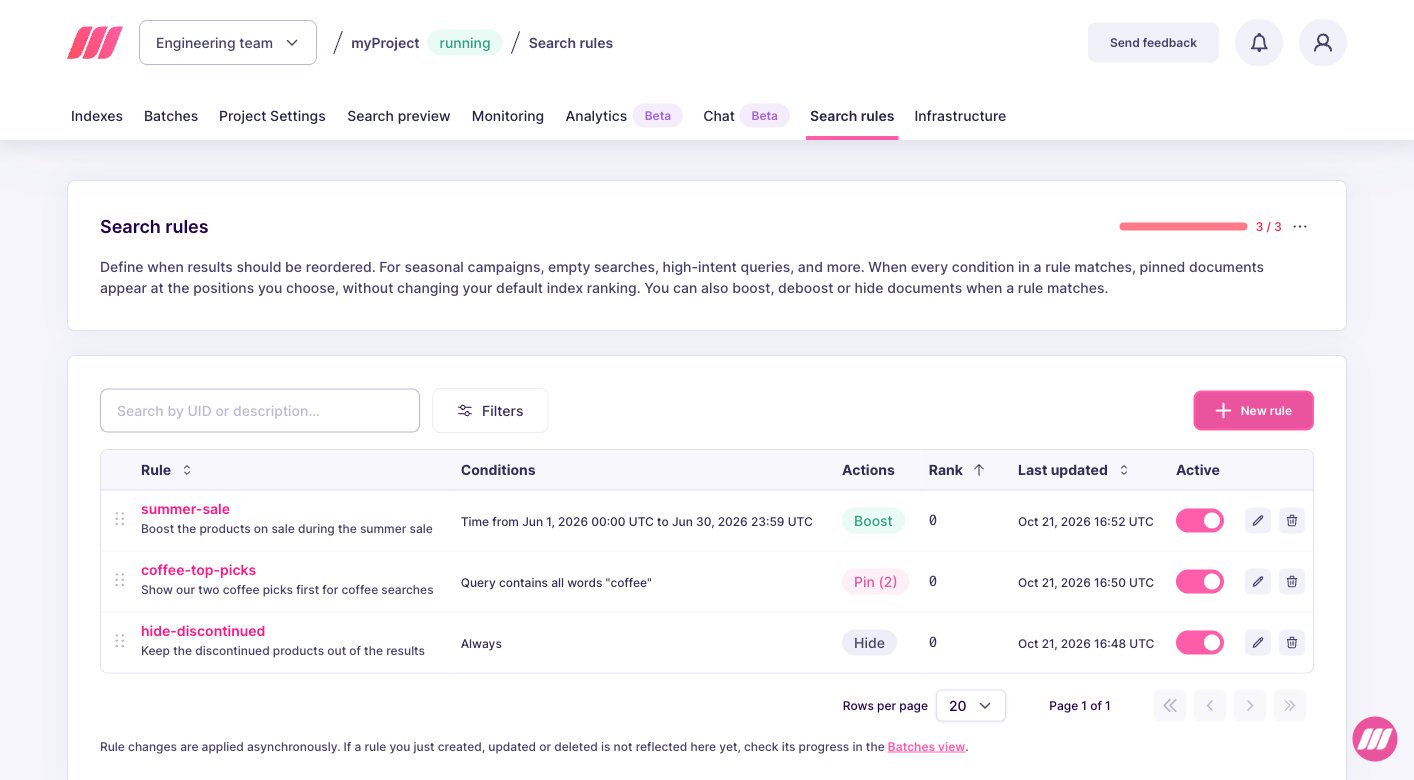
Sometimes you need to stop a rule from applying without losing its configuration. A campaign ended early, a pinned document needs to be reviewed before going live again, or a rule is misbehaving in production and you want to disable it while you investigate. Flipping a rule to inactive stops it from firing at search time while preserving every condition, action, and metadata field, so you can reactivate it later in one click or one API call.
Search rules are experimental. Enable the dynamicSearchRules flag with PATCH /experimental-features before creating rules. See Getting started.

Example scenario

The summer-sale-2026 rule is promoting a campaign landing page for “summer sale” queries, but marketing asked you to pull the landing page off the homepage for a few hours while they fix a typo. You want the pin to stop applying immediately, but you do not want to delete the rule: you will reactivate it once the landing page is back online. The right move is to set active to false. The rule stays in storage with all its conditions and actions, it just does not fire until you flip it back on.

Pause a rule from the Meilisearch Cloud dashboard

Open your project in the Meilisearch Cloud dashboard and select the Search rules tab.

1. Locate the rule

Find the rule in the Search rules list. Each row displays a status toggle on the right side, next to the edit and delete icons. Search rules list showing the active toggle on each row

2. Flip the Active toggle

Click the toggle to switch the rule from Active to Inactive. The change is saved immediately: the next search request no longer triggers this rule. When you are ready to reactivate the rule, flip the toggle back on. No other field is affected, so the rule fires exactly as it did before, with the same conditions and pin actions.

Pause a rule from the API

Send a PATCH /dynamic-search-rules/{uid} with only the active field:
{
  "active": false
}
Because the PATCH route is an upsert that only modifies the fields you send, this request leaves every other field untouched. The response returns 200 OK with the full updated rule, which should now show "active": false. To reactivate the rule, send the same request with true:
{
  "active": true
}

What changes and what stays the same

When a rule is paused:
  • It remains stored and visible in GET /dynamic-search-rules/{uid} and POST /dynamic-search-rules
  • Its conditions, actions, priority, and description are unchanged
  • It is skipped at search time, no pin is inserted
  • Time conditions are evaluated normally if the rule is reactivated later. A rule reactivated after its end date still does not fire because the time condition fails
When a rule is reactivated, it fires again from the next search request on, with no warm-up period.

Pause versus delete versus expire

ActionWhen to useReversible?
Flip active to falseShort-term pause, known reactivation window, fast rollbackYes
Remove the offending condition or actionRule needs to change, not stopYes (by reverting)
DELETE /dynamic-search-rules/{uid}Rule is permanently wrong or no longer relevantNo, you must recreate from scratch
Let a time window expire naturallyCampaign end is known in advanceNo reactivation needed, no cleanup
Prefer pausing over deleting whenever you think the rule might come back. Deletion is final, and rebuilding a rule from memory is error-prone.

Variations and tips

  • Safe rollback after a bad edit: if you just made changes to a rule and something looks off in production, flip active to false first, then investigate. Do not delete the rule while debugging.
  • Seasonal rules on standby: for recurring campaigns (Black Friday, summer sale), keep the rule paused between campaigns and reactivate it a few days before launch. Remember to update the time window before reactivating.
  • Bulk pause: the API has no bulk update, so pausing many rules at once requires a script that iterates over rule IDs. See List or filter existing rules for how to enumerate rules first.
  • Precedence interactions: while a rule is paused, it does not participate in priority comparisons. A lower-priority rule that would normally lose to the paused rule can now fire. Double-check after pausing a high-priority rule.

Next steps

List or filter existing rules

Find rules to pause or reactivate

Schedule a promotion

Expire a rule automatically with a time window

Pinning behavior

Learn how pins interact with ranking, filters, and precedence

API reference

Full request and response shapes